

Plugin for agentic research in experimental physics
PhysKit is a free, open-source framework for Claude Code and Codex: skills, prompts, templates, and code that give an AI agent the habits of a careful experimentalist — frame the problem first, check every result independently, label where every number came from, verify every citation — and build those habits into the tools the agent works with, not just its instructions.
Pre-release (v0.x): the skills and doctrine still change between versions.
Why it exists
Research agents can now do substantial work unattended. The more they do on their own, the more ways they can be wrong — confidently and plausibly, in ways that only surface when someone checks. PhysKit's answer is to build rigor into the system the agent works in, so that a domain expert can build on what it produces.
What you get
A general science toolkit
Skills for framing problems, verifying results, designing and validating simulations, dimensional analysis, deriving theory, debugging, and honest reporting. They work in any session; the agent picks the right one on its own.
Autonomous research campaigns
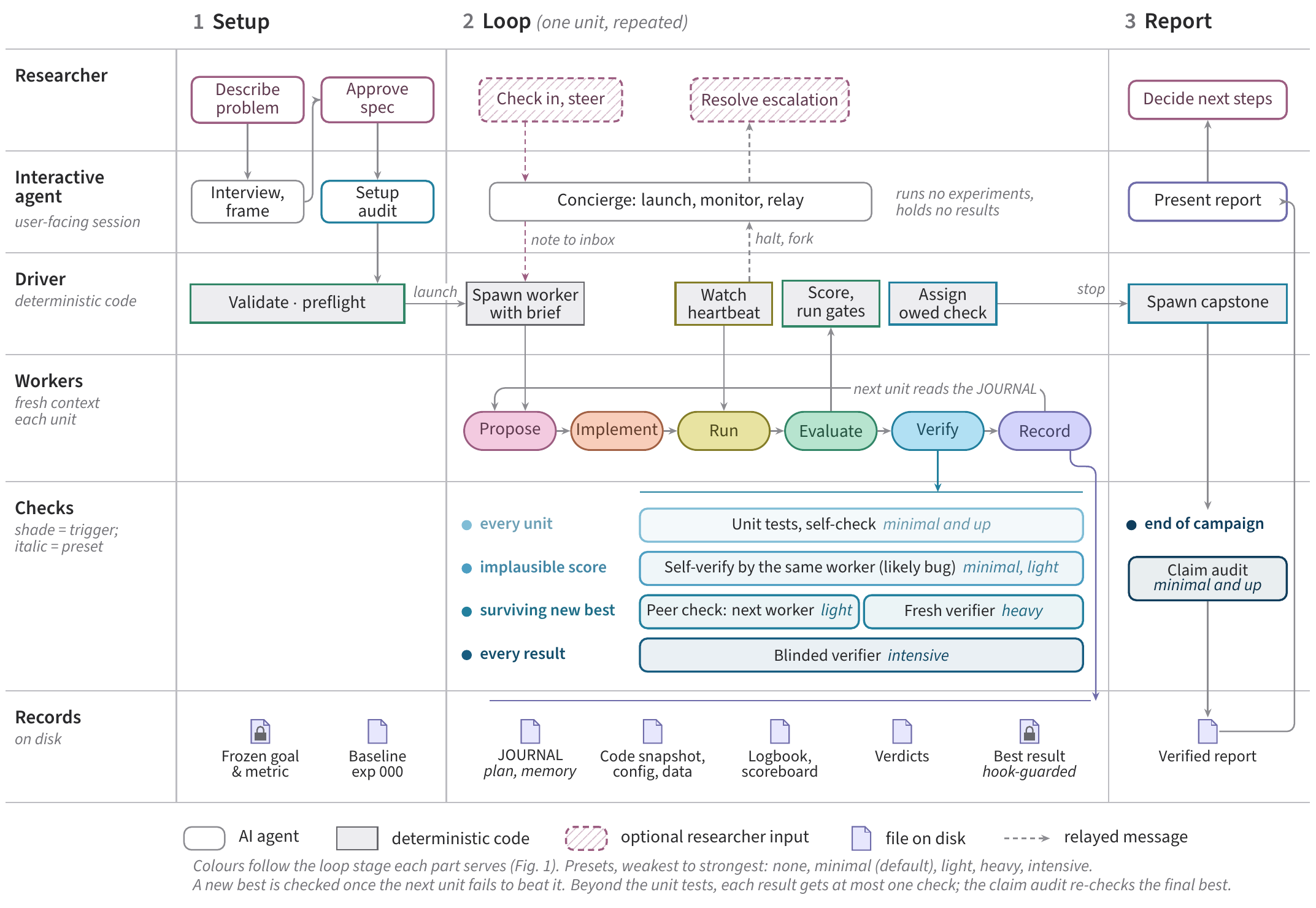
Scaffold and run a closed research loop — propose, implement, run, evaluate, verify, record, repeat — with a frozen honesty and verification core the loop cannot change, and health checks you can run while it works. How a campaign works ↓
Five skills to know by name
frame-problem | start any physics problem here — before modeling, simulating, or deriving |
verify | check a result, number, or derivation before relying on it |
report | write it up — every number labeled by provenance, every citation verified |
new-campaign | stand up an autonomous research campaign |
campaign-status | health-check or checkpoint a running campaign |
How a campaign works

1 · Setup
The agent interviews you first: the goal, the constraints, and the metric that will decide what counts as better. It runs a baseline experiment before anything changes, so every later result has something real to beat.
2 · Loop
Each cycle the agent proposes a change, implements it, runs it, and evaluates the result against the metric. Every result carries a label saying how it was checked, and every cycle is recorded, including the ones that failed. You can step in between cycles, or let it run.
3 · Report
When the goal is met, or you stop it, the claims are audited against the record before the report is written, and you decide what comes next.
How it guards against errors
No single safeguard is trusted alone. Each layer covers gaps in the others.
- Doctrine you read. An always-loaded constitution: truth over excitement, report every real evaluation (including failures), assume you're wrong until independently proven right, physical plausibility is a gate.
- Procedures you follow. Skills written as step-by-step procedures — for example,
verifychecks a result by an independent route, not by re-reading the reasoning that produced it, and recomputes every reported number. - Structure you fill in. Templates with required slots and append-only records, so an omission shows up as a blank instead of disappearing.
- Code that refuses. Executable gates — for example, a campaign can't promote a result under a stronger verification label than its checks earned, can't promote a refuted result, and can't promote anything while its correctness tests aren't passing.
The kit improves itself from reviews of real runs, but the honesty and verification core is frozen: a change that would weaken it is rejected outright.
Install
In a Claude Code session:
/plugin marketplace add Walsworth-Group/physkit
/plugin install physkit@physkit
In Codex, from your shell, then start a new session:
codex plugin marketplace add Walsworth-Group/physkit
codex plugin add physkit@physkit
Skills appear as /physkit:<name> in Claude Code and $physkit:<name> in Codex.
Scopes, updating, pinning a version, other agents, and keeping the doctrine always loaded:
the full install guide ·
getting started.
FAQ
What is PhysKit?
A framework for AI coding agents doing experimental physics: skills, prompts, templates, and code, installed as one plugin. It has two layers: a general science toolkit you can use in any session, and a campaign layer that runs closed-loop research campaigns with a frozen honesty and verification core.
Which agents does it work with?
The full plugin installs in Claude Code and Codex. OpenCode and Gemini CLI can use the general skills (not campaigns) through a bundled installer — see the multi-agent notes.
What does it cost?
PhysKit is free and MIT-licensed. You need access to the agent you run it in (Claude Code or Codex), which is billed separately by its provider.
Do I need to run an autonomous campaign?
No. The general skills — frame-problem, verify, report, and the rest —
work in ordinary sessions with no setup beyond installing the plugin. Campaigns are there when you want
the agent to iterate on a problem unattended.
How does it keep an agent from fabricating results or citations?
Several ways, layered. Every result carries an honest label saying how it was checked — unverified,
self-checked, or confirmed by an independent check — and the label travels with the number into every
report. Every number in a report is labeled by provenance, cite-check verifies each reference
against its source, and in a campaign executable gates refuse to promote a result under a stronger label
than it earned. These reduce the risk; they don't remove the need for you to check work you build on.
Is it safe to let it run unattended?
Campaigns are designed for it: the setup interview front-loads your decisions, the evaluation is
frozen so the loop can't quietly change how it is scored, a hook refuses to promote a result its checks
don't support, and campaign-status lets you check its health at any point. Note that in
Claude Code, the agents a campaign launches run without per-command permission prompts, because no one
is there to answer them; their limits are the campaign's own checks and, for hardware, the instrument
ranges you set at setup. Run campaigns in a project folder and on a machine where that is acceptable,
and supervise them the way you would a new student: check in, and read the report critically.
Does PhysKit send my data anywhere?
PhysKit itself makes no network calls — it is skills, templates, and local scripts. Your agent sends your session to its model provider as it normally does.
Is it only for experimental physics?
That is the focus for now: its doctrine, templates, and checks are written for experimental physics — measurements, instruments, and the simulations around them. Some general skills (verification, honest reporting, debugging) may be useful elsewhere, but that is not what it was designed or evaluated for.
What does "pre-release" mean for me?
Every version so far is 0.x, and skills, templates, and doctrine still change between versions. Use the latest; older versions stay tagged so that work which cites them can be traced.
How do I report a problem or suggest an improvement?
Open an issue on GitHub, or write to walsworth@umd.edu.
Cite
If you use PhysKit, please cite the paper and the software version you used:
N. R. Reed, D. M. Daly, A. J. Beling, J. D. Giandrea, R. L. Walsworth, J. W. Blanchard, and D. Ang, Principles and Techniques for Agentic Research in Experimental Physics, arXiv:2610.17193 (2026).
@misc{reed_principles_2026,
  title         = {Principles and Techniques for Agentic Research in Experimental Physics},
  author        = {Reed, Niko R. and Daly, Declan M. and Beling, Andrew J. and Giandrea, Jordan D.
                   and Walsworth, Ronald L. and Blanchard, John W. and Ang, Daniel},
  year          = {2026},
  eprint        = {2610.17193},
  archivePrefix = {arXiv}
}
GitHub's “Cite this repository” button gives the current citation in BibTeX and APA.